---
notionId: "1bcf0d27c79880c1858ad5a1c6a81151"
product: "account"
cluster: "account"
intent: "account.cancel-service"
docSlug: "cancel-service"
task: "Cancel your VirtualPBX service"
title: "Cancel your VirtualPBX service | VirtualPBX"
meta_description: "Any system administrator can cancel a VirtualPBX account. Open your user name at the top of the page, choose Cancel Account on the left, then choose the Cancel"
answer: "Any system administrator can cancel a VirtualPBX account. Open your user name at the top of the page, choose Cancel Account on the left, then choose the Cancel Account button. Complete the feedback form and choose Confirm and Cancel. The account ends at the close of the current billing cycle unless you ask to cancel sooner. Remaining phone numbers are released. Porting numbers out does not cancel the account by itself. Call (888) 825-0800 first if a technical or pricing issue brought you here."
audience: "billing"
updated: "2025-03-20"
legacy: ["cancel-your-service"]
headings: [{"depth":2,"text":"Who To Contact At VirtualPBX For Help","id":"who-to-contact-at-virtualpbx-for-help"},{"depth":2,"text":"If You Still Wish To Cancel Your Account","id":"if-you-still-wish-to-cancel-your-account"},{"depth":3,"text":"How to Cancel Your VirtualPBX Account","id":"how-to-cancel-your-virtualpbx-account"}]
lint: []
---
This guide will walk you through contacting our various departments for assistance with your system, or failing that, how to cancel your subscription with VirtualPBX
## Who To Contact At VirtualPBX For Help
Before proceeding with account cancellation, we want to ensure we've addressed any issues or needs that have lead you here.
If you're experiencing technical difficulties, contact our support team at +1 (888) 825-0800, Opt 2 or support@virtualpbx.com.
For pricing concerns or feedback, contact our account services team at +1 (888) 825-0800, Opt 4 or via accountservices@virtualpbx.com.
Do you need a specific feature? We do release new features and improve existing features continually. Contact our account services team to see if an existing feature can be made to suit your needs.
## If You Still Wish To Cancel Your Account
Any system administrator can cancel the account.
### How to Cancel Your VirtualPBX Account
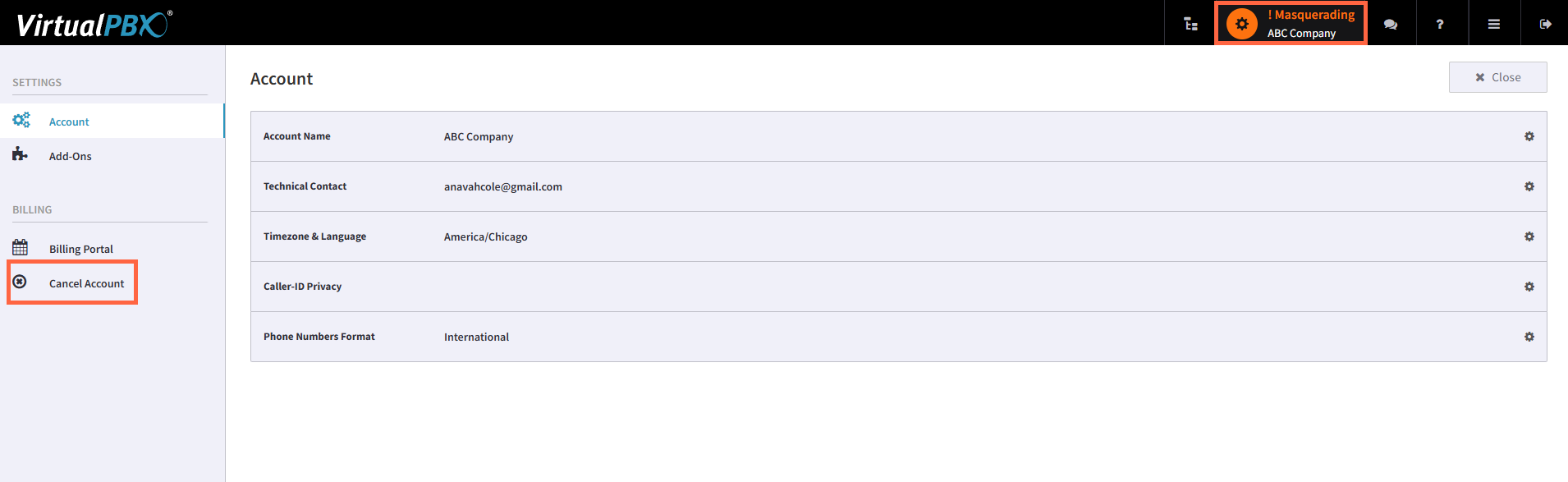
Click on Your User Name at the top of page
Click Cancel Account on the left side of the page
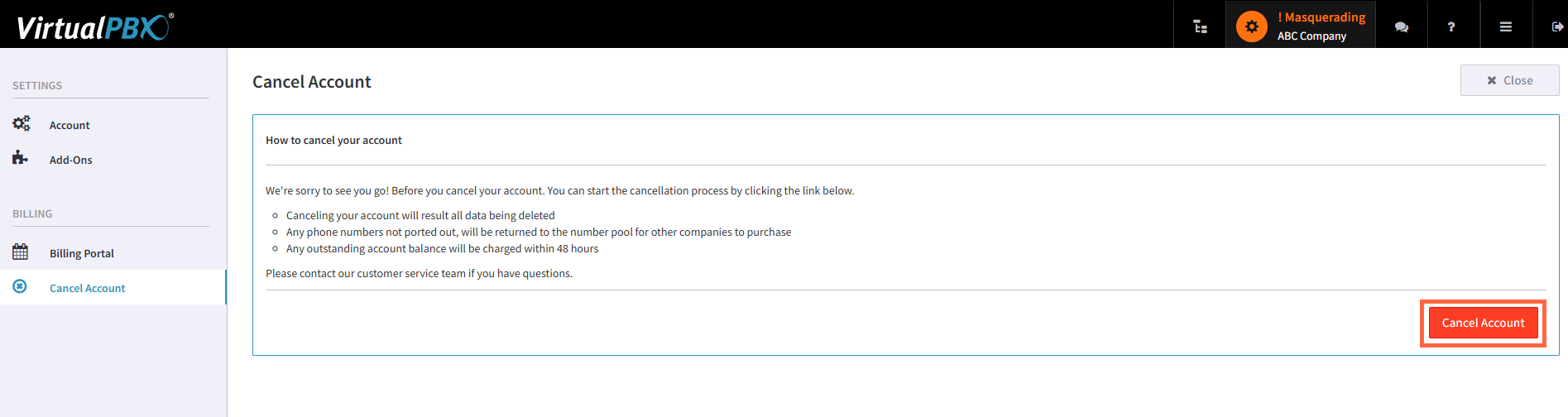
Click the “Cancel Account” button in the bottom right side of the page
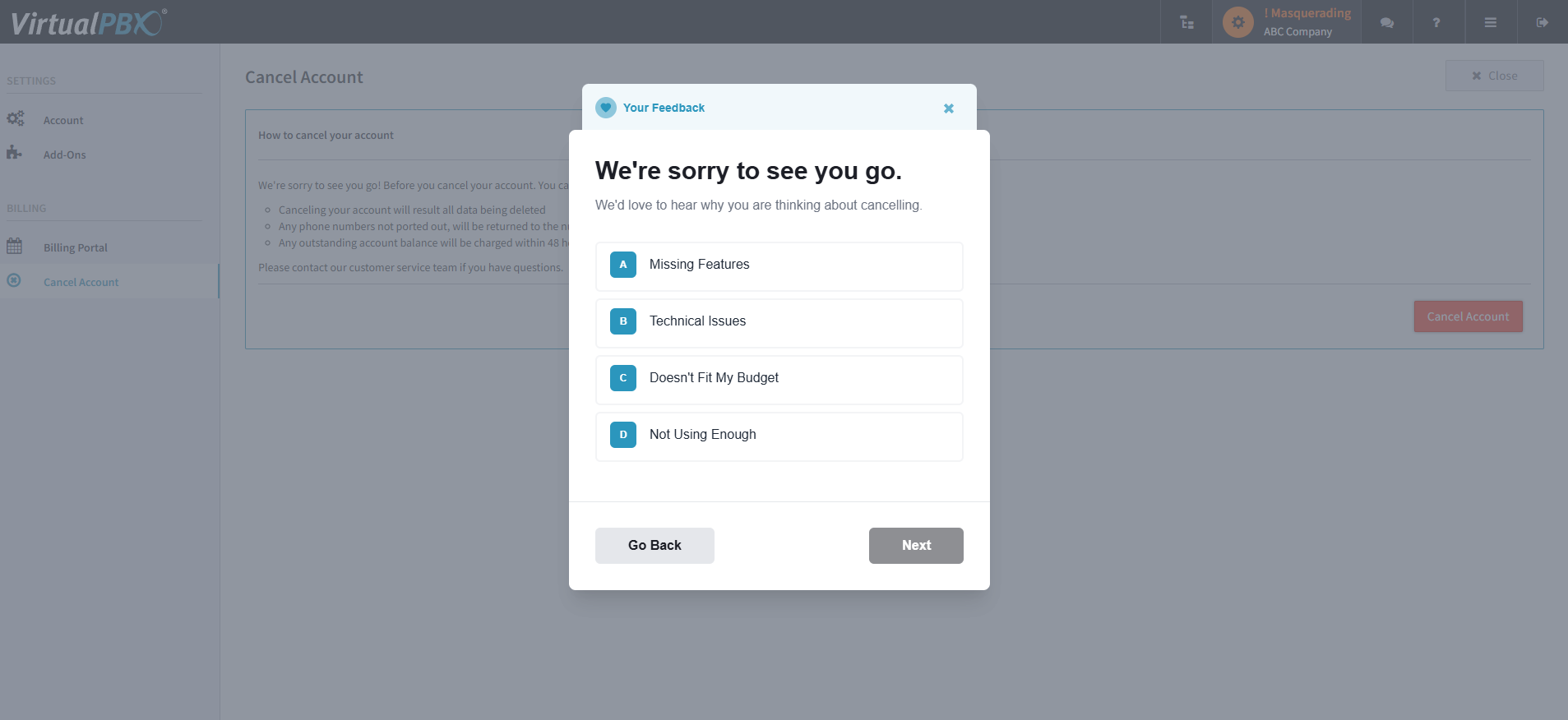
Fill out the feedback form that follows - at the end of the feedback submission there will be a “Confirm and Cancel button”. Once you click this, you’re done! Your account with VirtualPBX will be cancelled at the end of the current billing period.